Pages

Wednesday, December 28, 2011

Computer Can Speak Whatever You Type

This is an amazing trick to amaze your friends.By using this trick you can make your computer to speak whatever you type.This trick is working on all microsoft operating system and does not require any programming skills.You have to follow just simple steps and your own Text to Voicesoftware will be ready.If you show this software to any of your friends he will be certainly impressed with you .

1.Open Notepad and copy and paste the following code into it

Dim message, sapi
message=InputBox("What do you want me to say?","Speak to Me")
Set sapi=CreateObject("sapi.spvoice")
sapi.Speak message

2.Now save the notepad file with the any  name like speak.vbs extension should be vbs.

3.Now double click on speak.vbs type in the box whatever you want your computer to speak for you.


Friday, December 23, 2011

Hacking yahoo messenger for multi login


we often chat on yahoo messenger. I don't think so that there is anyone who really doesn't know about yahoo messenger. but what most people don't know us that we can chat with multiple accounts on yahoo messenger at same time. In other words we can chat with different IDs at same time.

So if you need to open and login multiple Yahoo! Messenger accounts as you have a few Yahoo! ID or various other reason, just use the small registry registration file below that once click, will modify and merge the registry setting required to run and execute multiple Yahoo! Messengers at the same time on a computer.

There are two Methods of doing this

1. Automatic Method
You just need to Download the file and install it into registry                                
Download From Here


2. Manual

Step1:- Open Registry Editor (regedit.exe) Click Start > Run and then type 'regedit' press enter.

Step2:- Then Look For- HKEY_CURRENT_ USER\Software\yahoo\ pager\Test.

Step3:- Then change this value of plural to like this- dword: 00000001


Hack Linux Password

Linux is an operating system which is come across it.
Though Mac and Linux are both based on UNIX, it is easier to change the password in Linux than it is OS X.

step-1:     To change the password, turn on the computer and press the ESC key when GRUB appears.
step-2:     Scroll down and highlight  "recovery mode" and press the "B" key; this will cause you to enter in a                   "single user mode".
step-3:     This will change the root password to whatever you enter.
step-4:     If you are interested in only gaining access to a single account on the system, however then type                     "passwrd username" replacing username with the login name for the account you would to alter the                  password for that account.

Tuesday, December 20, 2011

Making a computer virus

In this post we will study about the making computer virus in an easy way.

Step 1:- Download the Necessary software for VIRUS making.

Download From Here


Step 2:- Unrar the pack.

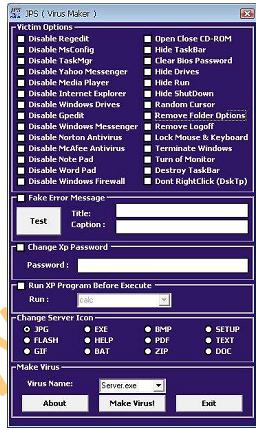
Step 3:- Now open the software and You Will Get the Following Screen. 


Step 4:- Now Select any (can be more then one) Victim option from the given options as done above.


Step 5:- For Virus of Fake Message select the Fake Error Message and write the message you want to display in caption and Title Like "Error" as shown below.


Step 6:-To change the Password of the computer on execution of virus check CHANGE XP PASSWORD and type the new password.


Step 7:-Run any program on starting the XP click on RUN XP PROGRAM BEFORE EXECUTE. And then select any program from list you want to run at the Starting on Xp.

Step 8:- Now select any server Icon; it is the icon of the virus file.


Step 9:- Now select any virus Name from the list so it can not be seen in the process from its own name.


Step 10:- Click  on the "make virus" button and the virus is made.


Step 11:- Now send this file to your friends and see what happens to his/her PC.

Related Posts Plugin for WordPress, Blogger...